Flip Video Camera
If you're in the market for an ultra-portable, highly affordable camcorder, the Flip Video and slightly improved Flip Video Ultra may be two of the best choices you can make. I was highly skeptical about the Flip even after reading rave reviews in places like the Wall Street Journal and Forbes. You can't possibly shoot decent looking video for under $150; at least that's what I thought.
At just thicker than an iPod, the Flip easily fits in your pocket meaning you have no excuse to not take it with you.
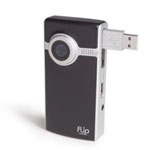 The $120-$150 price makes it not the end of the world if you ever drop or lose your Flip. And for that price, the Flip shoots video I'd put up against any of the DVD camcorders on the market and some of the low-end MiniDV camcorders. I'm not about to replace my Canon HV20 (or a Canon GL2) with the Flip, but for many situations, it's the perfect camcorder for catching impromptu moments.
The people that designed the Flip have the novice in mind, integrating a USB connector right into the camera body and including rudimentary editing software on the camera's internal drive. You can even upload straight to YouTube without ever using other software. TV Out right from the camera over composite makes it easy to connect to the closest screen to show off your footage. The Flip Video cameras use 2 AA batteries for power, with approximately 2 hours of life for standard AA batteries and up to 5 hours using the lithium AA batteries.
As with anything at the low end of the price spectrum, there are a few tradeoffs: no optical image stabilization and no optical zoom are two missing pieces; the microphone isn't the best at filtering out noise; there's no tripod mount on the original Flip Video (the Ultra has one). There is a 2x digital zoom, but quality deteriorates fast. Still, if you recognize these limitations in advance and want a camcorder that you're not afraid to take anywhere, you won't go wrong using the Flip.
You can see some sample footage below. If editing with the onboard software is too limiting, most other video editing apps also work, including Windows Movie Maker.
While the Flip camera has been discontinued, you can still find the Flip on ebay