How to Setup ATI CrossFire
"I have a Gigabyte S-series motherboard (GA-945GCMX-s2). I also have a Radeon x1300 and a Radeon x1650 Pro. I was wondering, with these components, if I could crossfire the 2 cards, or what other components I would need to do so."
I can definitely see the appeal of the extreme graphics configurations enabled via CrossFire, although I haven't personally found a need for them. The key to an optimal CrossFire configuration is to have a motherboard with CrossFire support and two video cards that have matching memory speeds and engine clocks. If the two cards have widely differing clock speeds, you get a pairing at the lower of the two clock speeds. In most cases, this means you want two cards of the same model for optimal performance.
Keep in mind that not everything benefits from CrossFire. Only applications optimized for CrossFire will receive performance enhancements, which generally means 3D games.
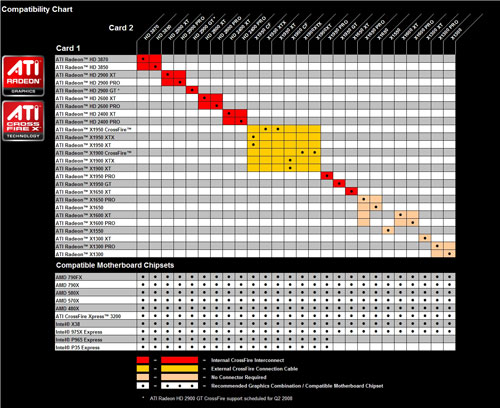
This image shows an optimal ATI CrossFire Configuration based on chipsets and video cards:
Motherboard Requirements
Your motherboard needs one of the following chipsets in order to be CrossFire compatible:
AMD 580X CrossFire chipset
AMD 480X CrossFire chipset
ATI CrossFire Xpress 3200 chipset
Intel X38 Express chipset
Intel 975X Express chipset
Intel P965 Express chipset
Intel P35 Express chipset
For more complete details on CrossFire, AMD has an excellent FAQ