Gmail Needs to Copy Rackspace Email Feature
Posted on November 22nd, 2009 by Jake under TechIf you're new here, you may want to subscribe to my RSS feed. Thanks for visiting!
[UPDATE] As many people are pointing out in the comments, Gmail has the Forgotten Email Detector available in the Gmail Labs experimental features. So the big difference is Rackspace recognized people need help with attachments and turned the feature on by default. In my book, Rackspace still provided better service.
Have you ever forgotten to attach a file to your email? I know I have.
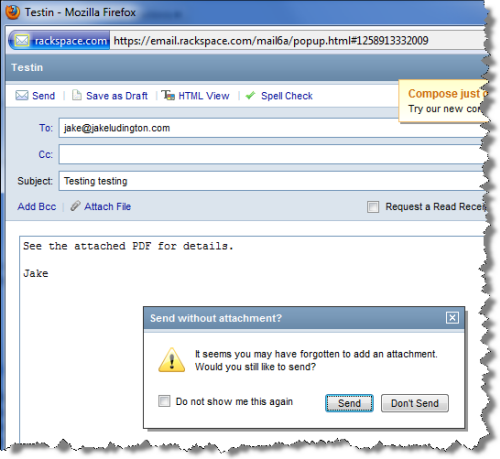
Gmail take note! Rackspace Email is the only email solution I’ve seen that traps this error and helps you avoid looking stupid. I just went to send an email with the words, ’see the attached PDF’ included and forgot to attach the PDF. When I hit send, I got a great warning message that tells me that it seems I have forgotten to add an attachment. Awesome! Any feature that keeps me from looking stupid is a good one. When is Gmail going to add this? In the meantime, kudos to Rackspace for getting it right.


November 22nd, 2009 at 10:28 am
Gmail has had this feature for a while… Turn on “Forgotten Attachment Detector” in Gmail Labs.
November 22nd, 2009 at 10:28 am
Actually, it does. Just go to settings, and from there go to labs. It’s got a lot of features you might not be aware of.
November 22nd, 2009 at 10:30 am
They already do: http://gmailblog.blogspot.com/2008/09/new-in-labs-handy-intern-tweaks.html
November 22nd, 2009 at 10:30 am
It’s already a Gmail feature under Google Labs…
November 22nd, 2009 at 10:34 am
I believe Gmail has that already in Labs (optional experimental settings). :)
<3
November 22nd, 2009 at 10:35 am
GMail has offered this for a while now. Go to Settings > Labs > Forgotten Attachment Detector and choose enable. It’s saved me several times…
November 22nd, 2009 at 10:36 am
If you look in the Gmail Labs feature, Google has “Forgotten Attachment Detector”. Its been around for at least 6 months.
November 22nd, 2009 at 10:45 am
Such a feature is available in Gmail and has been for quite some time. Settings>Labs, Scroll halfway down the screen and click enable next to Forgotten Attachment Detector.