Google Browser Sync
I have mixed feelings about the new Google Browser Sync. The premise is keeping all your Firefox settings synchronized across every computer you use, including bookmarks, history, persistent cookies, and saved passwords. This is good in theory. I know there are plenty of times when I find something on one computer and then have to remember which computer in order to find the resource again. My concern comes from the implementation. In order to keep passwords, bookmarks and everything else in sync, the information is uploaded and stored on a Google server using the same Google account used for GMail, Google Talk and all the various other Google applications. Storing passwords and browser history on Google's servers might be completely innocuous - a convenient repository of information. On the other hand all that information is definitively identifying in detail about where you go and what you do online. Google explicitly says in the terms of use, "Google may access, preserve, and disclose information regarding your use of the services if required to do so by law or under other conditions set forth in the Google Privacy Policy." This gets scary if you ever end up getting divorced and your future-ex subpoenas your Internet history as some sort of proving ground for a relationship turned sour, or more importantly if the government decides they want to investigate a large block of Google users for patterns of behavior.
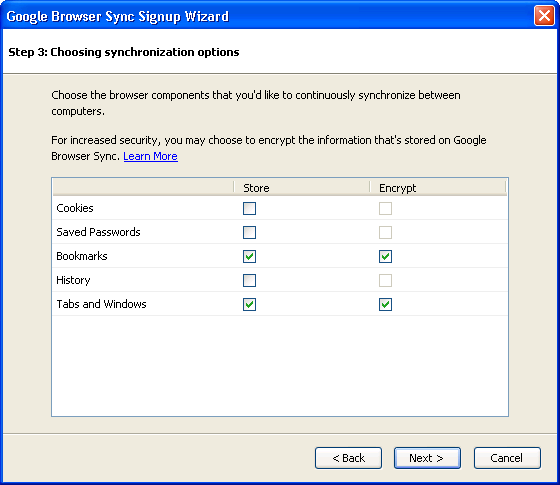
Keeping things in perspective, Google lets you choose what is or isn't synchronized using advanced configuration. Google offers encryption for all this data, but fails in letting us know whether they hold a master key to decrypt it on their end. From my view, I'm inclined to use something like this to store my tab groupings to easily open them on any computer, bookmarks for the convenience of accessing them, encrypt both, and pass on trusting Google to store passwords, history, and cookies on their server. Bottom line, if you opt to use Google Browser Sync, I recommend caution. [Firefox for Windows and Mac $0.00]