Convert WMV to MP4
I have several movies available in Windows Media WMV format. I want to convert the files for playback on PSP and iPod. What can I use to convert WMV to MP4?
If you edit movies using Windows Movie Maker or simply saved a bunch of video in WMV format, there's no direct conduit to getting videos to your PSP or iPod. Sony added WMA support to the PSP sometime back and it would be great to see WMV support if only because Windows Movie Maker is installed with every copy of Windows XP and ultimately Windows Vista. In the meantime, there are a handful of options for converting WMV files to MP4 files compatible with both PSP and iPod devices.
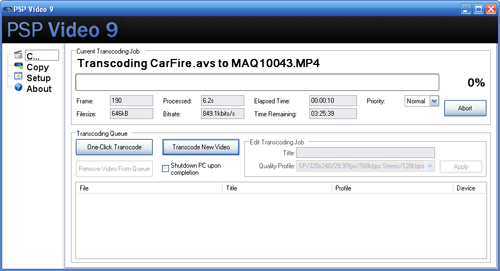
The easiest solution I've found for this conversion process is PSP Video 9 from Videora. It includes a number of settings compatible with both the PSP and iPod. PSP Video 9 automatically names files in a way recognized by the PSP and creates a .THM thumbnail file for each movie. While you might be tempted to use an h.264 encoding profile for iPod owners, using one of the PSP compatible settings will get you a file that looks good in both places, which saves time over creating a PSP specific file and iPod specific file.
Note: PSP Video 9 will pass WMV files through an AVISynth (*.avs) profile during conversion.
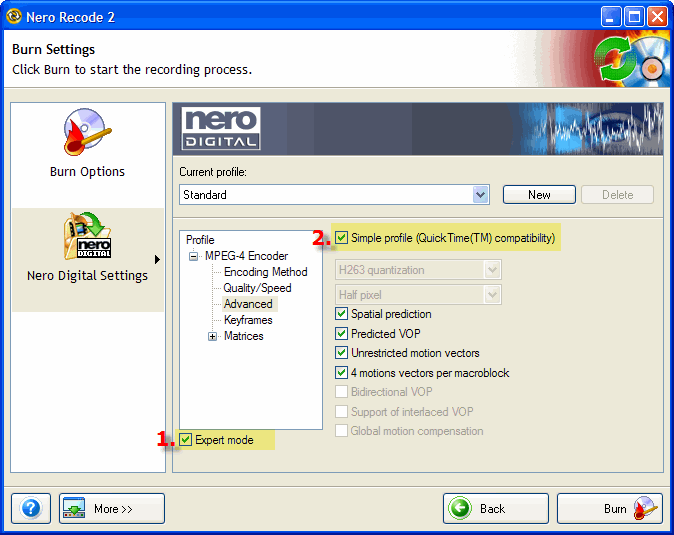
Another solid choice is Recode which is part of the Nero suite of media tools. Like most of the products in the Nero family, Recode doesn't have the most intuitive user interface on the planet, but the video conversion feature is rock solid. In general you can keep the default audio and video settings, but as you step through the wizard, be sure to check the box next to Expert Mode in the Nero Digital Settings, and check the Simple profile (QuickTime compatibility) under Advanced options, which is acutally to insure PSP compatibility not QuickTime.
You will need to rename your video file to something compatible with the PSP naming scheme before transferring the file to your PSP.