Tips for Shooting Video in the Snow
"Everytime I record videos of my dog playing in the snow, they come out looking washed out. What can I do to make my snow videos look better?"
Shooting movies of your pets outdoors, making nature videos, shooting outdoor sporting events, and shooting scenic movies all require special attention to the details, but one of the most challenging outdoor moments is shooting video in the snow. Here are a few tips (followed by a YouTube video from Videomaker magazine) to make shooting video in the snow a little easier. Follow the steps here and I guarantee your dog videos will look better.
Manual White Balance Gives You More Control - Most camcorders have preset configurations for shooting movies both indoors and outdoors. There's a color temperature adjustment in each case that's great for "normal" enviroments, but the outdoor one isn't necessarily optimized for snow. The generic Auto White Balance can sometimes deal with snow, but you'll get the best results using the manual over ride and dialing in the white balance yourself. If your camera offers the option to save presets, you can save this white balance setting and use it during your day outside in snow environments.
Lighting in the Snow is Tricky - Often the most comfortable times to be outside are in the middle of the day when the sun is high in the sky. This is also when shooting snowy video is the worst because strong sunlight makes everything look too white and washed out. Save shooting snow video midday for those overcast days. As a general rule, try to shoot your snow videos during sunrise times and sunset times, which gives you richer colors and more vibrant looking video filled with great pink, orange and purple colors.
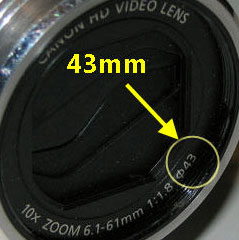 Neutral Density Filters - Using a neutral density filter can be a great way to take the harsh edge off the snow. You can typically find one that will fit your camcorder at the local photography store or online at Amazon. The thing you need to know is the ring size of your lens, which you can generally find right on the front of the lens like the one pictured here (which is a 43mm).
Capture the Spirit of the Outdoors - We generally associate snow with cold, so be sure to find shots that help identify the viewer with cold weather. Get video of the kids in a snowball fight. Pan tightly past icicles or rushing water in a snowy stream. Shoot snowboarders carving through the powder on the way down the slope or you dog leaping through drifts. You can warm the audience back up with indoor shots including sips of hot cocoa with your dog in your lap, or a crackling fire before closing out your video.
For more on shooting video in the snow, watch the video: