How to Close Outlook when Outlook is already closed
"I am trying to install Google Calendar Sync, but when it begins to install, a message pops up that I must close Outlook first. I do not have Outlook open. Any suggestions?"
There are many instances where you will have closed the Outlook application window without Outlook actually being closed. I'm not sure if this is a problem with Outlook or a feature designed to make it load faster when you re-open it later, but I find it frustrating on a regular basis. Some manual intervention is required to fix the problem.
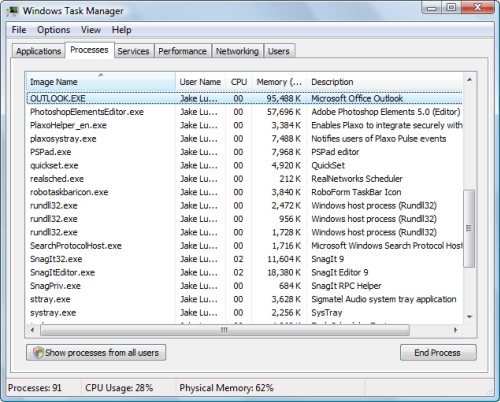
The solution is to open Windows Task Manager and end the Outlook.exe process before doing whatever you need to do without Outlook getting in the way. To end the Outlook process, open the task manager by holding down Ctrl+Shift+Esc. You can also get there using Ctrl+Alt+Del on your keyboard and clicking Start Task Manager.
On the Processes tab, locate Outlook.exe, select it by clicking on it, and then click the End Process button. Once you've done this, you can proceed without being warned that Outlook is still open.