Adding Multiple Movies to a Single DVD
"I want to make DVDs by adding multiple movies that i have on my hard drive. Is there any solution to burn DVDs in which I can have, say 6 movies of 700MB each (4200MB), on a single DVD and yet make it compatible to play on any DVD player? And maybe use the rest of space for the Menu,Subtitles,etc.?"
If DVD authoring were truly a what you see if what you get problem, you would have an easy solution. In the case of burning 700MB movies to DVD, what you see on your hard drive isn't what you get on DVD. For a DVD to be playable on a set top DVD player, the video format must be MPEG-2 conforming to the DVD authoring specification. It's highly likely the 700MB movies on your hard drive are in some other format, like DivX AVI files, WMV, RMVB, or possibly h.264 MP4 files. For these files to playback on standard set top DVD players, the files are first transcoded by your DVD burning software to conform to DVD standards. This transcoding process almost always results in a larger file.
You can get around this limitation using software that sacrifices video quality in order to fit more minutes of video on a disk, but the resulting DVD will not look as good as the files on your hard drive. When number of minutes of video on the disk is more important than the quality of the video, Sonic MyDVD offers a great solution.
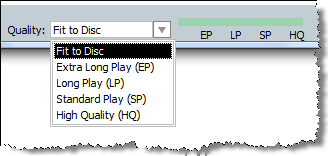 Sonic MyDVD defaults to a Fit to Disc mode, that happily crams all the video you want onto a single disk. It also offers a couple of other modes based on quality of video. This essentially give you two options; you can either author a DVD that maintains the quality of your video, or you can add multiple videos onto a single DVD. As more video is piled onto the DVD, Sonic MyDVD automatically adjusts the quality of the authored video to make sure it will all fit.