How to Fix Media Player Codec Errors
"Window Vista media player does not have sound on playing digital camera video clips. Returns codec error. Any suggestions?"
Many digital cameras record video with a file type AVI that uses a codec not included as part of a standard Windows installation. While there are some blanket codec packs that cover most of these missing codecs, I prefer to avoid them because they often introduce additional issues. Instead, it's often better to install the codec you need for a given situation and re-evaluate if you happen to discover a missing codec at some point in the future. To solve your problem, you need to first figure out which codec you need and then download the missing codec following these steps:
Required software: MediaInfo codec identification tool. (You'll want the version for Windows XP, even if you are using Vista)
After installing MediaInfo, step one is identifying what codec or codecs you might be missing. Open the application and then open the video file from your digital camera to scan for required codecs. The application locates required codecs and, if you don't have them installed, directs you to a download location.
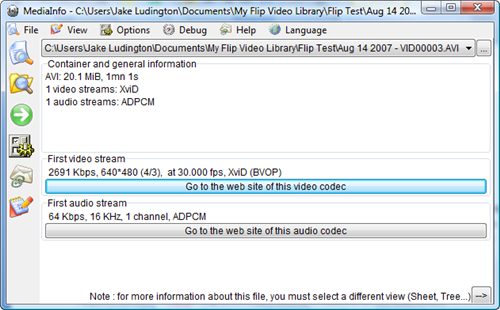
Once you scan for the codec you need, use the Go to the web site of this video (or audio) codec button to download the codec you need. After installation of the codec, you video should play in Windows Media Player.