
It’s still too early to call the horse race on HD-DVD and Blu-Ray. One format may win or we may end up with two competing formats for the foreseeable future. I’m going with HD-DVD because I can connect an HD-DVD drive to my Xbox 360 and get great looking movies.
One of the key disadvantages of HD-DVD is no convenient way to make back-up copies of the discs. The HD-DVD spec supports what’s known as a managed copy, but so far none of the HD-DVD disks I own have this feature. If I want to watch my HD content somewhere other than my Xbox, or if I want to backup my $30 investment, at this point, I have to create my own solution. Until someone starts giving me managed copies, I’m making copies of my HD-DVDs to watch them where I want to using an analog solution. Following the guidelines presented here, you can use an Xbox 360 with the HD-DVD drive and a PC to make copies of HD-DVD movies.
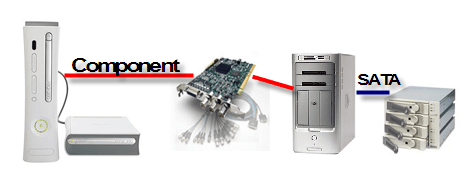
As the image outlines above, you need an HD capture card with analog component inputs. This card captures both the audio and video from the Xbox 360 via the component output cable. Audio will be passed either via the stereo outs on the component cable or via Toslink to your soundcard (the 5.1 Surround option). A four drive array of SATA disks provides enough disk write speed for real time capture of the HD video.
Breaking this down, the requirements for copying HD-DVDs using this method are:
- An Xbox 360 and Xbox 360 HD-DVD drive.
- Tons of fast-write drive space
- HD capture card with component inputs
- Video Capture Software
- Proper cabling
- Video conversion software to output a compressed HD video file
Xbox 360 and HD-DVD Drive
 The Xbox 360 and HD-DVD drive are self explanatory. If you don’t have these, you likely don’t have any reason to copy HD-DVDs.
 In theory, you could also create a similar workflow with the Toshiba HD-DVD player. I find the Xbox 360 to be more compelling because it allows you to extend your media from your PC, play HD-DVD movies and play games. After further investigation, the component output of the Toshiba HD-DVD player only supports resolutions up to 480p, so an Xbox is required to make this work.
Allocating enough Hard Disk Space
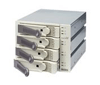 Capturing HD video requires massive amounts of drive space. More importantly you need drive space with fast write times. The easiest way to do this is to create a cheap RAID 0 array using either an onboard SATA controller or an external SATA card. For the HD-DVD capture scenario, you want a minimum of 4 eSATA drives connected to a controller, which provide throughput to easily caputre 720p or 1080i video. Capturing HD-DVD consumes approximately 6GB per minute of video. For a combination of speed and space, a four-drive configuration of 320GB SATA drives provides a little over a Terabyte of storage at a reasonable price.
- Promise SATA 4-Drive Enclosure
- Promise SATA Card
- Seagate 320GB SATA Drives
HD Capture with AJA XENA LH
 The best solution I’ve found for analog HD capture is the AJA XENA LH. It includes both HD-SDI support as well as the analog connections required for this component out capture process. I connect the onboard component input connections from the Xbox to the XENA LH. For my purposes, I’m capturing the audio as stereo, but you could also capture to a Toslink-capable audio card as well. The XENA LH ships a video capture application called Machina, which also has plug-ins for most major video editing apps.
PC Optimized for Video Editing
 Most PCs can handle standard definition DV from a digital video camera with no problem. HD capture is more complicated because you need to write the data as fast as it’s coming off the capture card. Disk drive write speeds will be a major limiting factor, but you also need plenty of horse power from your CPU and more memory will come in handy when it’s time to process the final video output.
It’s worth noting this scenario currently will not work with Windows Vista as there are no HD capture solutions with Windows Vista drivers.



