
“I want to send pictures to Facebook from my cell phone. I’ve tried sending a MMS message to mobile@facebook.com but my photos never show up in my Facebook account. What am I doing wrong?”
You are right that you need to either send photos to Facebook in an email or MMS to mobile@facebook.com in order to get your pictures in your Facebook account. In order to be able to upload your pics to Facebook, the first thing you need to do is activate your account.
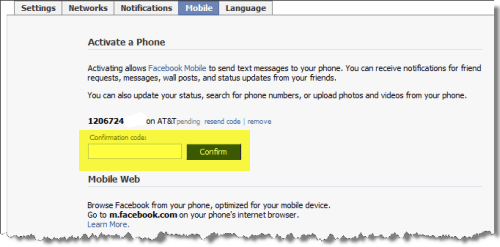
When you are signed in to Facebook, you need to make changes to your mobile settings in order to activate your account. If you click the Settings link at the top right side of your Facebook page, you then see several settings tabs. Click on the on that says Mobile. Enter you phone number and your cell phone carrier (I replaced the last four digits of my number with x’s because I don’t want lots of phone calls. 🙂

Facebook then sends you a text message to your phone with an activation code. Enter this activation code on the next screen and you’re all set to start sending photos to Facebook.
Keep in mind that your standard text messaging rates apply to any messages sent to Facebook using this method, so if you’re not on an unlimited plan, this might be a dangerous way to run up your text message bill quickly.
It’s also important to note that Facebook does not support this feature with all cell phone carriers. For instance, T-Mobile is not supported in the United States.
Other ways to Upload Photos to Facebook
If your phone has a web browser, the other way you can upload photos is by signing in to Facebook.com (not the m.facebook.com mobile version). Click on your photos tab and upload a photo just like you do when you sign in from a computer.



