
What is an RMVB file and what do I do with it? I downloaded what I thought was a video, but my computer says it doesn’t recognize RMVB as a valid file format.
RMVB is a RealMedia Variable Bitrate file. This is one of the newer formats from Real for publishing video files, which is quickly becoming a popular format for Anime and movie titles from Taiwan, Hong Kong, and other countries in Asia. The popularity is partly because of smaller file sizes and lower bitrates with exceptional quality compared to DivX, which has long been the standard for trading videos online. There are two options for playing back the file.
Downloading RealPlayer for free is the easiest way to play RMVB files. Real will encourage you to upgrade to one of their paid plans, but you aren’t required to. Another great option is to Download Real Alternative, which is free software for playing RealMedia files outside of RealPlayer.
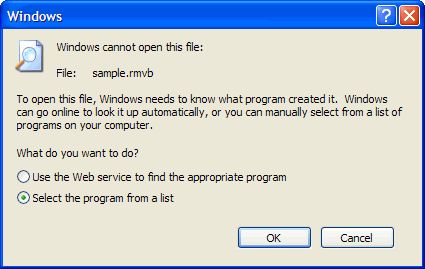
After installing either of these apps, you still need to associate the RMVB file type with the player because it isn’t recognized by default. Right-click the file and choose Open from the right-click menu. Choose Select the program from a list and click OK.
Choose RealPlayer or Real Alternative and leave the box checked next to Always use the selected program to open this kind of file.
When you click on any RMVB file, it should automatically launch RealPlayer to playback the file.

More things you should know about RMVB
How to Convert RMVB files
How to Burn RMVB files to DVD
Join 2 or more RMVB files



