“I recently purchased a JVC camcorder that records video as .MOD files. I can’t seem to edit the files or play them on my PC. Is there a way to convert .MOD files to .MPG or something that works on my computer?”
.MOD files are JVC’s implementation of MPEG-2 transport streams, similar to a VOB file on a DVD or the M2T files used on Sony hard drive camcorders. You don’t actually need to convert the files to .MPG in order to make them playable on your computer, you can simply rename them in most cases.
First copy the .MOD file from your video camera to your hard drive. Right-click the file and choose Rename from the menu.

Delete the .mod extension and replace it with .mpg.

Assuming you have DVD player software on your computer, the file should now just work almost anywhere you can play .mpg files.
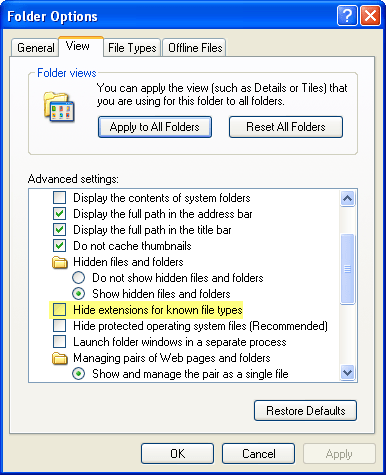
If you can’t see the file extension when you go to rename it, open Windows Explorer, go to Tools > Folder options, click the view tab and uncheck the box next to Hide extensions for known file types before completing the steps above.