Recently in Blu-ray Category

"Can I play a Blu-ray disc in my computer DVD player?

The short answer to your question is you can only play Blu-ray media in your computer DVD player if that DVD player is a Blu-ray drive. If standard DVD players supported Blu-ray playback our entertainment options would be far easier. Instead special hardware is required for Blu-ray. Think of the leap from DVD to Blu-ray as something similar to the leap from a standard CD player to DVD. A DVD player can typically also play CD media, but a CD player can't play a DVD. Blu-ray presents a similar problem. For playback on your computer, there are additional challenges beyond just having the right hardware.

If you bought into the HD-DVD technology as I did when it first launched, you may be stuck with a bunch of titles for hardware that's no longer supported. The movies and the hardware still work for now, but you won't see any new movies released on HD-DVD because the format is dead. In attempt to make good on all the purchases made during the early days of the Blu-ray and HD-DVD format war, Warner Brothers is offering the chance to swap 120 titles for their Blu-ray copies. How exactly does it work?

How can I play a Blu-ray DVD on my Windows computer? I know I need a new DVD drive, but what else do I need?"

To play a Blu-ray movie on your computer, there are several things you will need in addition to having a Blu-ray drive. Blu-ray requires fairly robust hardware for smooth playback, so you might need to upgrade some components in your computer. Blu-ray also requires software with the right codecs for playing Blu-ray disks. And if you are connecting an external monitor to your computer, your video card needs to be HDCP compliant in order for Blu-ray playback to work.

Software for Blu-ray playback

Software for playing Blu-ray is the easy part. Cyberlink PowerDVD Ultra plays Blu-ray media. It has the bonus of also playing AVCHD camcorder files.

How to Play Blu-ray with WIndows

Blu-ray Burner for Mac If you've been waiting for a Blu-ray burner to add to your Mac toolset, MCE has finally brought that wait to a close with their new 6x Blu-ray Recordable Drive for Mac Pro and Power Mac systems. Still no love if you're using a MacBook, but it's a good start. Of course, simply having a burner only gets you part of the way, if you really want a useful Blu-ray burning experience with your Mac, you also need a copy of Toast Titanium. MCE offers a Blu-ray burning plug-in for Toast that ties the whole thing together. In theory this also adds Blu-ray and HD-DVD playback to your Mac, although I'm not aware of any software that plays either format on a Mac for now. The standalone drive currently goes for $499, or $599 if you want a copy of Toast with it. There's also an external drive for $749, but you could likely make your own using the internal drive and a DIY external drive case (which would make the drive function with your MacBook).

The home theater PC market has been rather dull for several years. Sure you can get a sound card with 7.1 surround sound, but they've generally been noisier than I'd want in my own home theater. You can purchase video cards that output to an HDTV and support HDCP, but the experience hasn't been on par with using home theater components. At Computex 2008, AMD is showing off a couple of new boards from MSI that change the game in important fundamental ways.
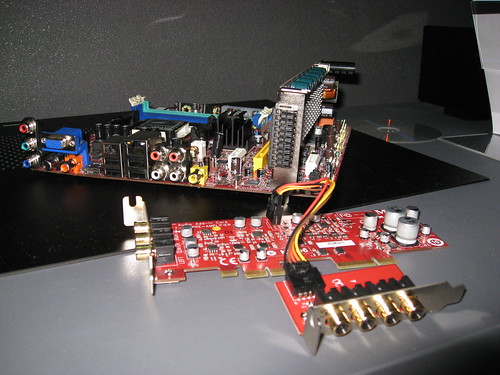
MSI AMD Live! Home Cinema Motherboard and Soundcard

First up AMD's 780 chipset supports Blu-ray and other HD video playback through integrated video on the motherboard. Nobody else can currently do this - Intel drops frames. Couple this with the MSI boards integrated component and HDMI out and you've got ease of use in getting the video portion of your PC signal easily to your television, without the nonsense of converting DVI to HDMI. You can of course still add a separate video card, but for normal home theater use it would not be necessary.
D2Audio Chip on MSI home theater motherboard The second key thing MSI and AMD have done is create something that grows with your audio needs. 2.1 surround (pre-amp) is included on the sound card with either analog outputs or digital. You can grow that to either 5.1 or 7.1 using an add-on card that easily extends your audio channels (That's the board in the front of the picture). The board seated on the motherboard provides amplified 5.1 surround. Audio uses a D2Audio chip on the motherboard to prevent extraneous noise.
Silent cooling for MSI motherboard A final component of this system is an ultra-quiet cooling system (pictured below). You're more likely to hear noise from your Blu-ray drive than you are from the fans keeping this entire thing cool. Best of all, I have it on good authority from a source at MSI that all this will be on the market by June 15, 2008 and you should be able to build a system (minus Blu-ray player) for under $1000.
"I want to connect my Blu-ray player (PS3) to my monitor. The monitor only has a VGA input. What would I need to convert the HDMI out on my PS3 to a VGA connection?"

One of the key challenges in converting HDMI to VGA is maintaining support for HDCP, which creates a protected signal path from Blu-ray players to a monitor as a means of preventing copying. There are a number of converters that will connect an HDMI cable to a VGA port, but anytime HDCP is present, instead of rendering the video signal, you get a black screen on the monitor. To avoid the black screen, you need a converter that includes support for HDCP.

"I have an HDTV and want to watch more movies in HD. Blockbuster says it rents high definition Bluray movies. My question is, can I play a Bluray disk in my DVD player and watch it on my HDTV?"

Unless your current DVD player is a Blu-ray player, it won't play Blu-ray discs. Blu-ray discs, while similar in appearance to standard DVDs, require a special blue laser to play the contents of the disc. Unfortunately this is somewhat complicated because there are several versions of Blu-ray discs and not all Blu-ray players can play all Blu-ray discs. If you're planning to buy a Blu-ray player in the near future, the PlayStation 3 game console is the only safe choice - it's currently the one Blu-ray player on the market that's software upgradeable to support any future changes to the format.

It's also worth pointing out here that your current DVD player will not play HD-DVDs either. You would need an HD-DVD player. Also, except for a couple of overpriced units that play both, you'd need a separate HD-DVD player for HD-DVDs and Blu-ray player for Blu-ray discs.

More on HD-DVD and Blu-ray.

In an article on InfoWorld today, Jeremy Kirk is reporting that we may finally get to make personal copies of our HD-DVD and Blu-ray movies without fear of going to jail. According to the article, the proposed licensing agreement is under negotiation by AACS Licensing Administrator members (including Sony, IBM, The Walt Disney Co., Warner Bros., and Microsoft) and the movie industry companies who use AACS copy protection to safeguard their content.

HD-DVD has a Managed Copy provision built into the specification, which allows for movie rights holders to enable consumers to make copies within a set of parameters. I'm less familiar with the inner workings of Blu-ray, but it seems to have a similar feature. Essentially the Managed Copy system is designed so that the copy remains in a rights managed state, but you have greater flexibility about what you can do with the copy. While this doesn't go far enough for some people, I certainly wouldn't care about making copies of my movies, if I knew that I could easily put a movie on my iPod or play it back from my home theater PC without having to buy the same movie three times.

While this doesn't solve the problem of making copies of titles currently available only on DVD, having a forward looking solution is certainly a step in the right direction. The next step toward placating those of us who like to have easy ways to consume our favorite entertainment when and where we want is to make it legal for cable and satellite companies to offer network DVR as a valid product offering. This would essentially mean that you could watch any show recently available in your cable lineup at any time, even if you forgot to set up your Tivo. BitTorrent and other P2P services currently fill this need, but at least in the United States we're considered criminals if we opt to locate shows out on the public Internet.

Subscribe for Free!

Your E-mail Address: