
Mike asks, “I have a 7 second heartbeat audio track. I want to make it a 5 minute track. What is it called and how do I do it?”
What you’re describing here is what’s commonly referred to as looping an audio track. This is frequently done with a section of audio that’s either repeated for a few times throughout a musical composition or a loop might be used to create a bed for an entire segment of music. The actual implementation varies slightly depending on which audio application is used, but the basic premise is the same – you figure out how long the piece of audio you want to loop is (7 seconds in this case) and then you establish how many times you need to play a 7 second file to achieve 5 minutes of continuous playback.
I’ll walk through the process for how to loop a file in Audacity, which will turn your 7 second recording into five continuous minutes. Audacity is great for this because it’s free for Windows, Mac, and Linux.
If you don’t already have it, download Audacity and install it before starting this project.
First open your audio file in Audacity by launching the application and choosing Project > Import Audio from the menu. With your audio file open, select the entire audio file either from the menu by choosing Edit > Select > All or the key command Ctrl+A.
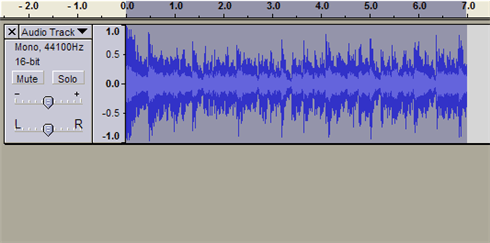
Choose Effect > Repeat from the menu
Audacity bases repeats on the number of times required to repeat the file to achieve the desired length. 5 minutes is 300 seconds, so assuming your file is exactly 7 seconds long, it needs to play almost 43 times.
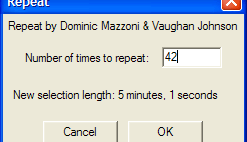
In order for the file to play 43 times, you need it to repeat 42 times because the first time it plays already exists on the audio timeline.
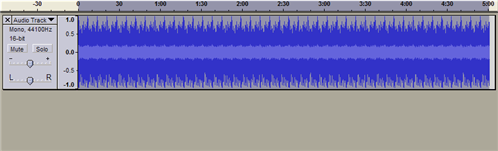
You can see after clicking okay the timeline shows 5 minutes of audio instead of the 7 seconds we started with. Save your new file by choosing Export as WAV from the timeline and you now have a 5 minute audio file with the original 7 second file left untouched.



