
Jake Ludington's MediaBlab
Subscribe Subscribe

Feedback


Video help and audio answersGot an Audio or Video Question? I've answered hundreds of them and compiled the most popular questions in a downloadable searchable 200-page collection of answers. From finding the right codecs to play your movies, to converting files to new formats, this guide steps you through solutions to dozens of audio and video problems. Think of this as the ultimate painkiller for your personal digital video and audio headaches. Download Audio and Video Answers today!

Playing Video Backwards with Pinnacle

Peter writes, "I have captured some video and now I would like to play it backwards and insert it into a film to give the appearance of catching a knife when in fact I threw it. How can I do it? I have Videowave II and Pinnacle Studio, neither of which seem to be able to do this. Do I need extra software?"

To the best of my knowledge, even the newest version of Videowave still lacks support for playing film clips in reverse. The latest version of Pinnacle Studio does support playing video clips backward, although the way you get there is a not intuitive. I'll also show you another way to play your video backward using AVISynth and VirtualDubMod to make a reverse clip compatible with any video editor.

Playing a Clip Backward with Pinnacle Studio

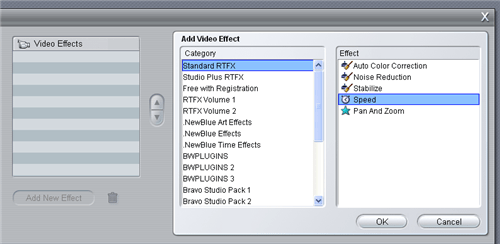
With the clip you want to play backward on the timeline selected, open the Video Toolbox Effects lists by choosing Toolbox > Add Video Effects. (You can also do this by clicking the video camera icon above the timeline and then clicking the power plug icon, but the menu gets you there faster)

In the Standard RTFX category of Video Effects, choose Speed and click OK.
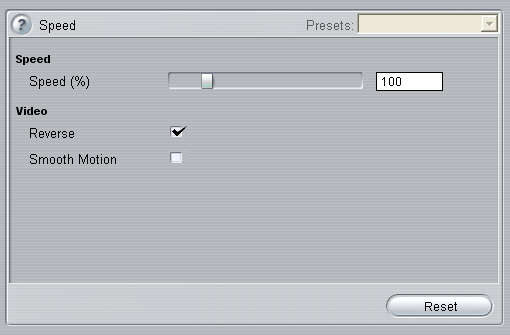
On the Speed effect configuration, check the box next to Reverse. You can speed up or slow down the reverse playback by changing the Speed percentage.
Your video should now play backward on the timeline.

Read how to play a video backwards using AVISynth and VirtualDubMod. (This method works for any video editor, including Windows Movie Maker and Roxio Easy Media Creator).




Featured Resources

How to choose the right Identity Protection service.
Read our comparison of identity protection options to help you pick the best one for your family.

Master Home Movie Editing
Read a detailed guide on how to improve your home movies.

Instantly Fix Driver Problems
Find missing drivers on your XP or Vista PC.

Back up your iPod
iPod Access backs up your iPod music library and transfer songs to a new computer.

Convert Vinyl to MP3 or CD
Convert your Vinyl LPs and Cassettes to CD or MP3 using a simple software solution.

Multimedia Help
Camcorder Answers
AVCHD Help
Digital Video
HDTV
Media Center PC
Movie Maker Help
Photography
Podcasting

Productivity
Gadgets
Gmail Tips
Office Help
Outlook Tips
PowerPoint
VoIP
Web Services

Mac, iPod, iPhone
Mac Help

Social Media
Facebook Help
MySpace Tips
YouTube Tips

Video Games
PSP Hacks
PSP and iPod Movies
Xbox 360

Comparison Shopping
Memory Cards
Digital Cameras
Digital Video Cameras
MP3 Players
DVD Players
HD Television
Pocket PC
GPS Devices
Cell Phones